All Type Coding

Search Here

Built-in Data Types in c#

C# is a strongly-typed language. Before a value can be stored in a variable, the type of the variable must be specified. The type must be specified both for simple, built-in types such as an int, and for complex or custom types such as XmlDocument.
The CSharp type system contains three Type categories
They are: 
1-Value Types: The Value Types store the data The Value Types derived from System.ValueType The value types directly contain data. for examples are int, char, and float When you declare an int type, the system allocates memory to store the value.
Boolean type – Only true or false 
Integral Types - sbyte, byte, short, ushort, int, uint, long, ulong, char
Floating Types – float and double
Decimal Types 
if you want  get the exact size of a type or a variable on a particular platform, you can use the sizeof method. 
The syntax: sizeof(type) 
for Example:

using System;
   class Program 
   {
      static void Main(string[] args)
      {
         Console.WriteLine("Size of int: {0}", sizeof(int));
         Console.ReadLine();
      }
   }

}

Output :
Size of int: 4

2- Reference Types: Reference Types store references to the actual data.the Reference Types derived from System.Object .for Example of built-in reference types are: object, dynamic, and string.
Example of object:
object obj;

obj = 10;

Example of dynamic:
dynamic <variable_name> = value;
For example:

dynamic a = 10;

string: 
The String Type allows you to assign any string values to a variable. The string type is an alias for the System.String class. It is derived from object type

Example of string:
String str = "Tutorials Point";
or
@"ALLTYPECODING";


3- Pointer Types: Pointer Types variable use only in unsafe mode.
Syntax: pointer type is:


type* identifier;
For example,
char* abcd;

int* pic;

Escape Sequences in C#
http://msdn.microsoft.com/en-us/library/h21280bw.aspx

Verbatim Literal is a string with an @ symbol prefix, as in @“Hello". 


Verbatim literals make escape sequences translate as normal printable characters to enhance readability. 

How to use command line tools in c#

The command line compiler is a very powerful tool. You can build large complex Solutions from the command line just as easily as you can build a small “My First Program”CSC is the command for compiling the CSharp source code on Command Line . When you run the CSC Command on Command line the program generate a .EXE file. Create new Text document and copy and paste below code like below


Now Save this file like below


Select the location where you want to save this file like below. Here I select the desktop location and give the name of file with .cs 
For Example. SimpleProgram.cs

After saving the file you will see one file created  on that selected location like below

Now go to start menu click on microsoft visual studio 2010 or 2012 whatever version  is there and click visual studio tool and select  Developer Command Prompt like below ...

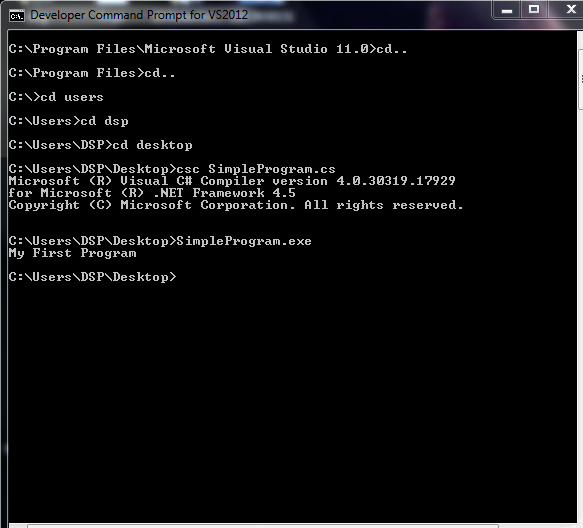
Now first of all set the directory like below I set that directory where is your source file Here I set my directory desktop like below.

When you run the CSC Command on Command line the program generate a .EXE file. on same location where is that your source file like below Here left file is .EXE file and right side is the source file. We execute or call this file like above
for example.
csc SimpleProgram.cs
after executing we call .EXE file 
For Example:
SimpleProgram.exe
after executing the above line its show output like above screen "My First Program"


How to create a Window Application in c#

First of all Open visual studio go to-> file ->new ->project
after that select like below image


when you will click on ok button then a window form will open in front of you in your project like below


what I did here drag a button like above after that double click on button and write red color code inside the button event like below

using System.Drawing;
using System.Linq;
using System.Text;
using System.Windows.Forms;

namespace WindowsFormsApplication1
{
    public partial class Form1 : Form
    {
        public Form1()
        {
            InitializeComponent();
        }

        private void button1_Click(object sender, EventArgs e)
        {
            MessageBox.Show("Hello AllTypeCoding");
        }
    }

}

When you executing this c# window program the output will be:


How to Reading and writing to a console

First of all Open visual studio go to-> file ->new ->project
after that select Console Application like my previous tutorials. after that
copy below code and paste in your project
Here we will discuss about 
1. Reading from the console
2. Writing to the console
3. There are two ways to write to console
     a) Concatenation syntax 
     b) Place holder syntax 

Code samples for Concatenation 
using System;
class Program
{
    static void Main()
    {
        Console.WriteLine("Please enter your name");
        string UserName = Console.ReadLine();
        // Concatenate name with hello word and print
        Console.WriteLine("Hello " + UserName);
    }
}

Code samples for Place holder
using System;
class Program
{
    static void Main()
    {
        Console.WriteLine("Please enter your name");
        string UserName = Console.ReadLine();
        //Placeholder syntax to print name with hello word 
        Console.WriteLine("Hello {0}", UserName);
        Console.ReadKey();   
 }
}
Output will be same:


Diffrence vs WriteLine and Write method in c#
The Write () method outputs one or more values to the screen without a new line character.

The WriteLine() always appends a new line character to the end of the string. this means any subsequent output will start on a new line.

How to write a program in c#

First of all Open visual studio go to-> file ->new ->project


after that select Console Application like  above image
We will learn the basic structure of a c# program. C# allows us to write programs like Console Bases Applications as well as Windows Based Applications Now I wrote a code for simple program in c# copy below code and paste in your project

using System;

    class Program
    {
        static void Main(string[] args)
        {
            Console.WriteLine("--- WELCOME TO ALLTYPECODING ---");
            Console.ReadKey();
        }

    }

When you run this C# program you will get 
"--- WELCOME TO ALLTYPECODING ---" in the console and the system wait for the input from the user. Console.ReadKey() is waiting for user input. 

Output :


Here using System is a namespace - The namespace declaration,using System, indicates that you are using the System namespace. If  you omit the using System, declaration, then you have to use the fully qualified name of the Console class like below.

 class Program
    {
        static void Main(string[] args)
        {
       System.Console.WriteLine("--- WELCOME TO ALLTYPECODING ---");
       System.Console.ReadKey();
        }
    }

 A namespace is used to organize your code and is collection of classes, interfaces, structs, enums and delegates.
The Main() method - It is the entry point into your application.

An introduction to C#

CSharp is an Object Oriented Language,C# (pronounced C sharp) is a programming language designed for building a wide range of enterprise applications that run on the .NET Framework. developed by Microsoft and approved by European Computer Manufacturers Association (ECMA) and International Standards Organization (ISO).C# was developed by Anders Hejlsberg and his team during the development of .Net Framework.The goal of C# is to provide a simple, safe, modern, object-oriented, highperformance , robust and durable language for .NET development. Also it enables developers to build solutions for the broadest range of clients, including Web applications, Microsoft Windows Forms-based applications, and thin- and smart-client devices.
introduced in the .NET Framework. C# is a professional programming language and is very similar to C++ in many ways. We can implement the Object Oriented concepts like encapsulation, inheritance, and polymorphism in C# programming development .
C# is a Simple, Powerful , general-purpose and Type-Safe language also Case Sensitive . We can develop C# projects in Visual StudioEnvironment , a powerful tool-rich programming environment from Microsoft. We can create console based applications as well as windows based applications from C# environment. C# Coding style is very similar to C++ and JAVA , so the developers who are familiar with those languages can pick up C# coding quickly.

How to print V shape stars.?

using System;

class Program
{
    static void Main(string[] args)
    {
        int i, j, n;
        Console.WriteLine("Enter the no for V shape stars");
        n = int.Parse(Console.ReadLine());
        Console.Write("\n");
        for (i = 1; i <= n; i++)


        {
            for (j = 1; j <= i; j++)
            {
                
                Console.Write("*");
            }
            for (j = n; j >= i; j--)
            {
                
                Console.Write(" ");
                
            }
            for (j = n - 1; j >= i; j--)
            {
                Console.Write(" ");
                
            }
           
            for (j = 1; j <= i; j++)
            {
                
                Console.Write("*");
               
            }
            
            Console.WriteLine();
            
        }
      
        Console.ReadKey();
    }
}
Output: